Multi-LTE Dongle Networking on Raspberry Pi
Configure multiple USB LTE dongles with separate routing tables. Each request routes through a different network interface.

SERIES
Distributed Browser Automation
One IP address means one identity. Make 100 requests from the same IP, and rate limiters notice. Make requests from 6 different IPs, rotating based on recent usage, and you look like 6 different users.
USB LTE dongles cost $20-40 each. Prepaid data SIMs are cheap. Plug six of them into a powered USB hub connected to a Raspberry Pi, and you have six independent cellular connections - each with its own IP address that changes when you reconnect.
The challenge: how do you route specific requests through specific dongles?
Implementation Note: This post covers the Linux policy routing foundation. The current implementation uses a SOCKS5 proxy server that routes requests based on username (e.g.,
dongle1:x@host:1080). The routing tables and fwmark mechanism described here power both approaches.
The Architecture
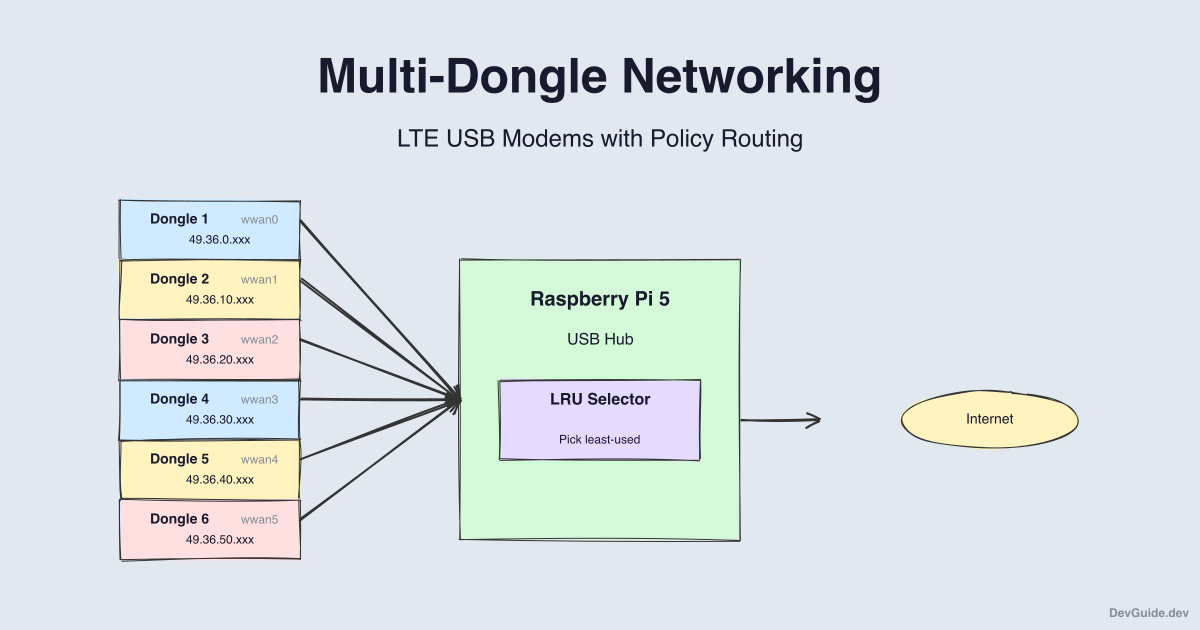
The key mechanism: Linux policy routing with fwmark.
When the Python code sets SO_MARK on a socket, the kernel marks outgoing packets with that number. Policy routing rules (ip rule) match marked packets and route them through specific routing tables. Each table has a default route through a different dongle interface.
Prerequisites
- Raspberry Pi 5 with powered USB hub
- 1-6 USB LTE dongles (E3372, ZTE MF833V, or similar)
- SIM cards with data plans
- Raspberry Pi OS 64-bit
Hardware Setup
Most USB LTE dongles work out of the box on Linux. They appear as network interfaces:
usb0,usb1,usb2, etc. (most common)wwan0,wwan1, etc. (some models)eth1,eth2, etc. (dongles in Ethernet mode)
Connect dongles to the powered hub, then verify they’re recognized:
# Check USB devices
lsusb

# Check network interfaces
ip link show

# Look for usb* or wwan* interfaces
ip addr show | grep -E 'usb|wwan'
If a dongle doesn’t get an IP automatically:
# Bring interface up
sudo ip link set usb0 up

# Request IP via DHCP
sudo dhclient usb0
Step 1: Install Required Packages
sudo apt update
sudo apt install -y modemmanager iproute2 iptables
ModemManager handles cellular connections. iproute2 provides policy routing tools.
Step 2: Understand Policy Routing
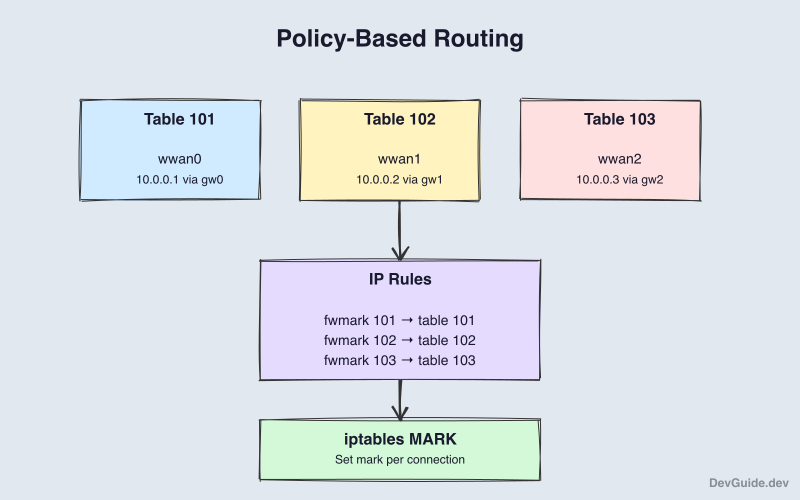
Linux can have multiple routing tables. By default, all traffic uses the main table. We create additional tables for each dongle:
Table 100 (dongle1): default via 10.0.0.1 dev usb0
Table 101 (dongle2): default via 10.0.0.1 dev usb1
Table 102 (dongle3): default via 10.0.0.1 dev usb2
...
The ip rule command connects packet marks to tables:
fwmark 1 → lookup dongle1
fwmark 2 → lookup dongle2
fwmark 3 → lookup dongle3
...
When Python sets socket.SO_MARK = 2, the kernel marks packets with 2, the rule matches, and traffic goes through dongle2 table, which routes through usb1.
Step 3: Create the Setup Script
Create the routing setup script:
mkdir -p ~/rpi-proxy/scripts
cd ~/rpi-proxy/scripts
Save this as setup-routing.sh:
#!/bin/bash
# LTE Dongle Setup Script
# Configures routing tables for each detected dongle

set -euo pipefail

NUM_DONGLES=${NUM_DONGLES:-6}
RT_TABLE_BASE=100

log() {
    echo "[$(date '+%Y-%m-%d %H:%M:%S')] $1"
}

# Detect dongle interfaces
detect_dongles() {
    local dongles=()

    for iface in /sys/class/net/usb*; do
        [[ -e "$iface" ]] && dongles+=("$(basename "$iface")")
    done

    for iface in /sys/class/net/wwan*; do
        [[ -e "$iface" ]] && dongles+=("$(basename "$iface")")
    done

    echo "${dongles[@]}"
}

# Get IP of an interface
get_ip() {
    ip -4 addr show "$1" 2>/dev/null | \
        grep -oP '(?<=inet\s)\d+(\.\d+){3}' | head -1 || echo ""
}

# Get gateway for an interface
get_gateway() {
    ip route show dev "$1" 2>/dev/null | \
        grep -oP '(?<=via\s)\d+(\.\d+){3}' | head -1 || echo ""
}

# Setup routing table for one dongle
setup_routing_table() {
    local dongle_id=$1
    local iface=$2
    local table_num=$((RT_TABLE_BASE + dongle_id - 1))
    local table_name="dongle${dongle_id}"

    local ip=$(get_ip "$iface")
    local gateway=$(get_gateway "$iface")

    if [[ -z "$ip" ]]; then
        log "WARNING: No IP for $iface"
        return 1
    fi

    log "Setting up $table_name for $iface ($ip)"

    # Add table to rt_tables if missing
    if ! grep -q "^$table_num" /etc/iproute2/rt_tables 2>/dev/null; then
        echo "$table_num $table_name" >> /etc/iproute2/rt_tables
    fi

    # Clear existing routes
    ip route flush table "$table_name" 2>/dev/null || true

    # Add default route
    if [[ -n "$gateway" ]]; then
        ip route add default via "$gateway" dev "$iface" table "$table_name"
    else
        ip route add default dev "$iface" table "$table_name"
    fi

    # Add rule for marked packets
    ip rule del fwmark "$dongle_id" table "$table_name" 2>/dev/null || true
    ip rule add fwmark "$dongle_id" table "$table_name"

    # NAT for return traffic
    iptables -t nat -C POSTROUTING -o "$iface" -j MASQUERADE 2>/dev/null || \
        iptables -t nat -A POSTROUTING -o "$iface" -j MASQUERADE

    log "Configured $table_name"
}

# Write dongle map for the renderer
write_dongle_map() {
    local map_file="/etc/dongle-map.json"
    local dongles=($(detect_dongles))

    echo "{" > "$map_file"
    local dongle_id=1
    local first=true

    for iface in "${dongles[@]}"; do
        [[ $dongle_id -gt $NUM_DONGLES ]] && break

        local ip=$(get_ip "$iface")

        $first || echo "," >> "$map_file"
        first=false

        printf '  "%d": {"interface": "%s", "ip": "%s", "mark": %d}' \
            "$dongle_id" "$iface" "${ip:-}" "$dongle_id" >> "$map_file"

        ((dongle_id++))
    done

    echo "" >> "$map_file"
    echo "}" >> "$map_file"

    chmod 644 "$map_file"
    log "Wrote $map_file"
}

# Main
main() {
    log "Starting dongle setup..."

    local dongles=($(detect_dongles))

    if [[ ${#dongles[@]} -eq 0 ]]; then
        log "ERROR: No dongles detected"
        exit 1
    fi

    log "Found ${#dongles[@]} dongle(s): ${dongles[*]}"

    # Enable IP forwarding
    echo 1 > /proc/sys/net/ipv4/ip_forward

    local dongle_id=1
    for iface in "${dongles[@]}"; do
        [[ $dongle_id -gt $NUM_DONGLES ]] && break
        setup_routing_table "$dongle_id" "$iface" || true
        ((dongle_id++))
    done

    write_dongle_map
    log "Setup complete"
}

main
Run it:
chmod +x setup-routing.sh
sudo ./setup-routing.sh setup    # Configure routing
sudo ./setup-routing.sh status   # View status
Step 4: The Dongle Selector
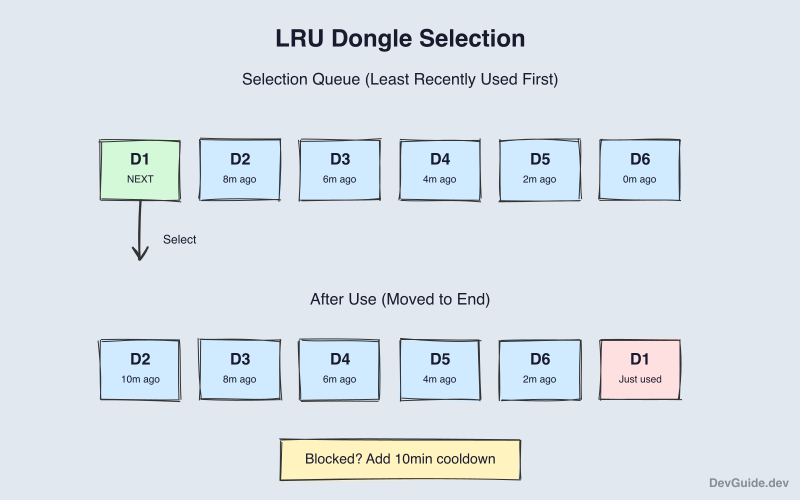
This Python module selects dongles using LRU (Least Recently Used):
# dongle_selector.py
"""
Dongle selector with LRU algorithm and cooldown support.
"""

import json
import os
import socket
import time
from dataclasses import dataclass
from typing import Optional, List, Dict

DONGLE_MAP_FILE = "/etc/dongle-map.json"


@dataclass
class DongleState:
    id: int
    interface: str
    ip: Optional[str] = None
    mark: int = 0
    last_used_at: Optional[float] = None
    status: str = "healthy"  # healthy, cooling, offline
    cooldown_until: Optional[float] = None


class DongleSelector:
    def __init__(self):
        self.dongles: Dict[int, DongleState] = {}
        self._load_dongle_map()

    def _load_dongle_map(self):
        """Load dongle config from /etc/dongle-map.json."""
        if os.path.exists(DONGLE_MAP_FILE):
            with open(DONGLE_MAP_FILE) as f:
                data = json.load(f)
                for id_str, config in data.items():
                    dongle_id = int(id_str)
                    self.dongles[dongle_id] = DongleState(
                        id=dongle_id,
                        interface=config.get("interface", ""),
                        ip=config.get("ip"),
                        mark=config.get("mark", dongle_id),
                        status="healthy" if config.get("ip") else "offline"
                    )

    def select_dongle(
        self,
        requested_id: Optional[int] = None,
        exclude_ids: Optional[List[int]] = None
    ) -> Optional[DongleState]:
        """
        Select the best available dongle.

        Uses LRU: picks the dongle that was used longest ago.
        Respects cooldown periods for blocked dongles.
        """
        exclude_ids = exclude_ids or []

        # Check cooldowns
        now = time.time()
        for d in self.dongles.values():
            if d.cooldown_until and now > d.cooldown_until:
                d.status = "healthy"
                d.cooldown_until = None

        # If specific dongle requested
        if requested_id:
            dongle = self.dongles.get(requested_id)
            if dongle and dongle.status == "healthy":
                return dongle

        # LRU selection
        available = [
            d for d in self.dongles.values()
            if d.status == "healthy" and d.id not in exclude_ids
        ]

        if not available:
            return None

        # Sort by last_used_at (oldest first)
        available.sort(key=lambda d: d.last_used_at or 0)
        return available[0]

    def mark_used(self, dongle_id: int):
        """Record that a dongle was just used."""
        if dongle := self.dongles.get(dongle_id):
            dongle.last_used_at = time.time()

    def mark_blocked(self, dongle_id: int, cooldown_seconds: int = 600):
        """Put a dongle on cooldown after being blocked."""
        if dongle := self.dongles.get(dongle_id):
            dongle.status = "cooling"
            dongle.cooldown_until = time.time() + cooldown_seconds


# Usage example
if __name__ == "__main__":
    selector = DongleSelector()

    for _ in range(10):
        dongle = selector.select_dongle()
        if dongle:
            print(f"Selected: Dongle {dongle.id} ({dongle.interface})")
            selector.mark_used(dongle.id)
        time.sleep(0.5)
Step 5: Using SO_MARK in Python
The renderer can now route traffic through specific dongles:
import socket

def create_marked_socket(mark: int) -> socket.socket:
    """Create a socket that routes through a specific dongle."""
    sock = socket.socket(socket.AF_INET, socket.SOCK_STREAM)
    sock.setsockopt(socket.SOL_SOCKET, socket.SO_MARK, mark)
    return sock

# Example: fetch IP through dongle 3
sock = create_marked_socket(3)
sock.connect(("api.ipify.org", 80))
sock.send(b"GET / HTTP/1.1\r\nHost: api.ipify.org\r\n\r\n")
response = sock.recv(4096)
print(response.decode())
sock.close()
For Playwright, which manages its own sockets, you’d need a local proxy per dongle or use iptables PREROUTING rules. The simplest approach is to let the selector track which dongle is assigned to which job and report it in metadata.
Integration with the Renderer
Update the renderer to use dongle selection:
from dongle_selector import DongleSelector

selector = DongleSelector()

@app.route("/job", methods=["POST"])
def handle_job():
    data = request.get_json()
    job_id = data["job_id"]
    url = data["url"]
    exclude_dongles = data.get("exclude_dongles", [])

    # Select dongle
    dongle = selector.select_dongle(exclude_ids=exclude_dongles)
    if not dongle:
        return jsonify({"error": "No dongles available"}), 503

    # Render the page
    result = render_page(url)

    # Mark dongle as used
    selector.mark_used(dongle.id)

    # If blocked, put on cooldown
    if result["blocked"]:
        selector.mark_blocked(dongle.id, cooldown_seconds=600)

    return jsonify({
        "job_id": job_id,
        "dongle_id": dongle.id,
        "dongle_ip": dongle.ip,
        **result
    })
Run on Boot
Create a systemd service. Replace YOUR_USERNAME with your actual username:
sudo tee /etc/systemd/system/dongle-routing.service << 'EOF'
[Unit]
Description=LTE Dongle Routing Setup
After=network.target

[Service]
Type=oneshot
ExecStart=/home/YOUR_USERNAME/rpi-proxy/scripts/setup-routing.sh setup
RemainAfterExit=yes

[Install]
WantedBy=multi-user.target
EOF
Edit to replace YOUR_USERNAME, then enable:
sudo nano /etc/systemd/system/dongle-routing.service
sudo systemctl enable dongle-routing
Troubleshooting
Dongle not getting IP:
sudo mmcli -L                    # List modems
sudo mmcli -m 0 --simple-connect="apn=internet"
Routing not working:
ip route show table dongle1      # Check table exists
ip rule show                     # Check rules
curl --interface usb0 https://api.ipify.org  # Test directly
Packets not marked:
Ensure you’re running as root or have CAP_NET_ADMIN capability. SO_MARK requires privileges.
What’s Next
We have multi-dongle networking working. But what happens when a site shows a CHALLENGE? In the next post, we’ll build a Cloud Run service that uses Google Cloud Vision to solve text-based CHALLENGEs.