What Is NAT? Explained Simply
NAT explained with a simple house and mailbox analogy. Understand why your router translates addresses and why your friend cannot join your game server.

“Why can’t my friend join my game server?”
You’ve got Minecraft running. Port forwarding is configured. The server says it’s listening. Your friend types in your IP address, and… nothing. Connection refused.
You check the firewall. You restart the router. You google “port 25565 not working” for the third time this hour. Someone on Reddit mentions “NAT type” and suddenly you’re down a rabbit hole of networking jargon.
Here’s the thing: NAT isn’t complicated. It’s just poorly explained.
The House and Mailbox Analogy
Imagine your house has one mailbox on the street. That’s your public IP address - the one address the whole internet knows.
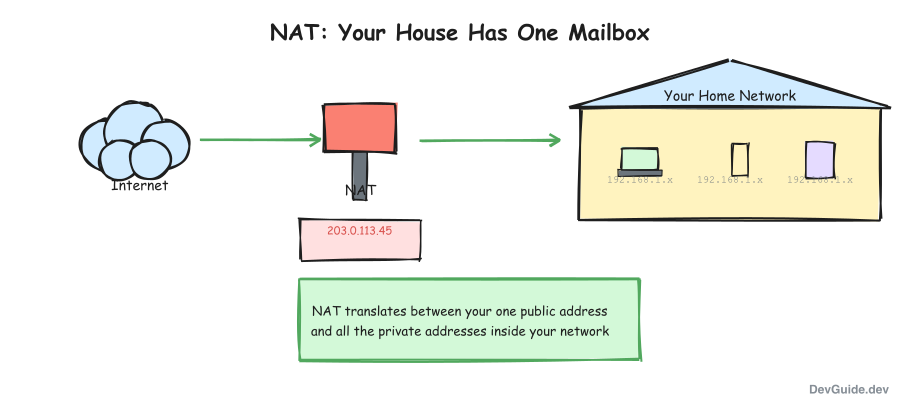
But inside your house, you have multiple people who want to send and receive mail: your phone, laptop, tablet, smart TV. Each device needs to communicate with the internet.
NAT is like a helpful parent standing at the mailbox.
How Outbound Requests Work
When your laptop wants to send a letter (data) to the internet:
- The letter goes to the parent at the mailbox
- The parent writes down “this came from the laptop” in a notebook
- The parent puts the house address on the envelope and sends it out
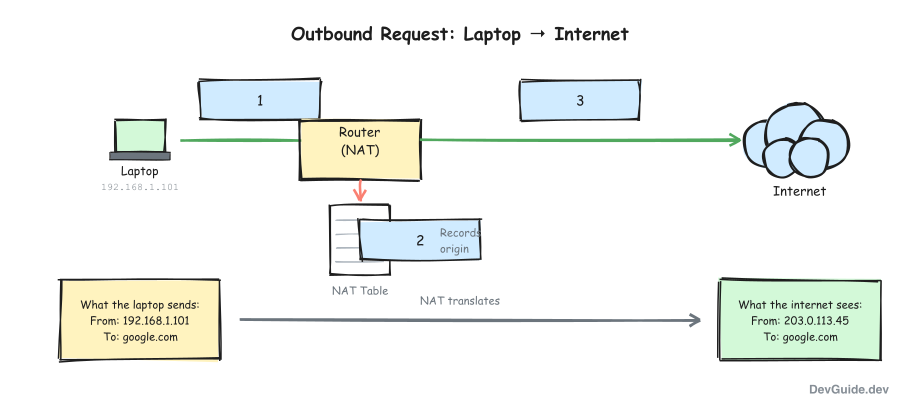
From the outside world’s perspective, all mail comes from one address: your house. The mail carrier doesn’t know (or care) that there are five people inside all sending letters.
How Inbound Replies Work
When a reply comes back to your house:
- The parent checks the notebook: “Oh, this reply is for the laptop”
- The parent hands it to the laptop inside the house
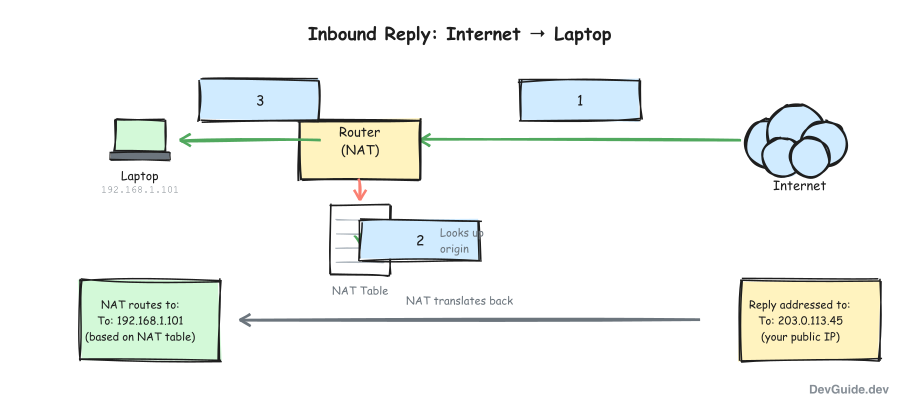
This works beautifully for replies. The parent remembers who asked for what.
But here’s the problem: what if someone sends mail to your house without anyone asking first?
The Game Server Problem
When your friend tries to connect to your Minecraft server, they’re sending mail to your house unprompted. They knock on the mailbox and say “I’m here for a game!”
The parent at the mailbox looks confused. Nobody inside asked for this. The notebook has no record. So the parent does the only sensible thing: ignores the request.
This is why your friend can’t connect.
Port forwarding is you telling the parent: “Hey, if anyone shows up asking about games (port 25565), send them straight to the laptop.” You’re adding a permanent note in the notebook.
Why Do We Need NAT?
There aren’t enough “street addresses” (public IPs) for every device in the world. IPv4 only has about 4.3 billion addresses, and we ran out years ago.
So your router gives each device a “room number” (private IP like 192.168.1.x) that only works inside your house. NAT translates between “room numbers” and the one “street address” everyone outside sees.
| Address Type | Example | Who Can See It |
|---|---|---|
| Public IP | 203.0.113.45 | The entire internet |
| Private IP | 192.168.1.105 | Only devices in your home |
Your laptop might be 192.168.1.105 inside your house. But when it talks to Google, Google sees 203.0.113.45 (your router’s public IP). NAT handles the translation.
The Key Insight
NAT is just your router keeping track of which device inside asked for what, so replies go to the right place.
That’s it.
The complexity comes from edge cases: What if two devices want to use the same port? What if you want to host a server? What about video calls that need both sides to connect? These are real problems, but they’re not about understanding NAT. They’re about working around its limitations.
Quick Reference
NAT (Network Address Translation): Your router translating between private addresses (inside your network) and your public address (what the internet sees).
Why it exists: Not enough public IP addresses for every device. NAT lets thousands of devices share one public address.
The limitation: Incoming connections to devices behind NAT don’t work unless you explicitly configure port forwarding, because the router doesn’t know which device to send the traffic to.
The notebook: Technically called the NAT table. It maps internal IP:port combinations to external port numbers so replies route correctly.
Next time someone asks why their game server isn’t working, you’ll know: there’s a confused parent at the mailbox with no instructions for what to do with unexpected visitors.