Shipyard: A Serialized Deploy Queue for a One-Person, Many-Agent Dev Shop
How a filesystem queue, one supervisor, and a ship branch keep AI-agent deploys from clobbering each other - install, branch model, lifecycle, commands.

Two Claude Code sessions, one project, ten minutes apart.
Session A deploys a fix. Session B - working in its own git worktree, on its own branch - deploys right after, from a tree that never contained A’s commits. Production now runs B’s snapshot. A’s fix is gone. No error anywhere. Both deploys reported success.
Nobody made a mistake. The tooling simply allowed two deploys to interleave.
This is the story of Shipyard, the serialized deploy queue I now run on my Mac. Every deploy - from a foreground Claude session, from an autonomous build worker, eventually from cron - goes through one queue, one at a time. This post covers how it works, the branch model behind it, how to install it on a new machine, what a task’s full lifecycle looks like, and every command you need.
The problem: many agents, one production
Most deploy safety advice assumes a team of humans with a CI/CD pipeline. My setup is different: one human, many AI agents, and a pile of small production projects deployed by make deploy from a laptop.
When AI agents do most of the coding, deploys stop being a human-paced event. On a busy day there are several sessions running in parallel, each in its own git worktree, each able to type make deploy. That creates three failure classes:
- Concurrent deploys clobber each other. Two sessions deploy the same project; the later one ships a tree without the earlier one’s commits. A freshness check (“am I behind origin?”) does not save you, because a fetch only sees pushed state - it cannot see a deploy that started from another local working tree two minutes ago.
- Deployed bytes that exist nowhere else. A deploy from an unpushed branch means production runs code that lives only on one laptop. If that laptop dies, the source of what is live in prod dies with it.
- Failed deploys poison the main branch. The classic flow is merge first, deploy second. When the deploy then fails,
mainalready claims the broken state. The next person (or agent) builds on top of it.
Each of these had either bitten me or come close. The fix for all three turned out to be the same old idea databases use: stop allowing concurrent writers. Make deploys a queue.
What Shipyard actually is
Shipyard is deliberately boring technology: four directories, one bash supervisor, and JSON files. No daemon framework, no database, no cloud service.
The queue lives in my task-hub repo at ~/wk/mytodos/shipyard/ as four lane directories:
| Lane | Meaning |
|---|---|
ready/ | Submitted requests waiting their turn |
building/ | The one request currently executing (never more than one) |
done/ | Deployed, verified, and recorded |
failed/ | Anything that did not make it, with a machine-readable reason |
Each request is a directory like 0042-casestatusdotin-app containing a request.json (project, module, the exact commit SHA to deploy), and later a log.txt and an outcome.json. Moving a request between lanes is a mv - which on the same filesystem is atomic, so the rename itself is the claim lock. No flock gymnastics.
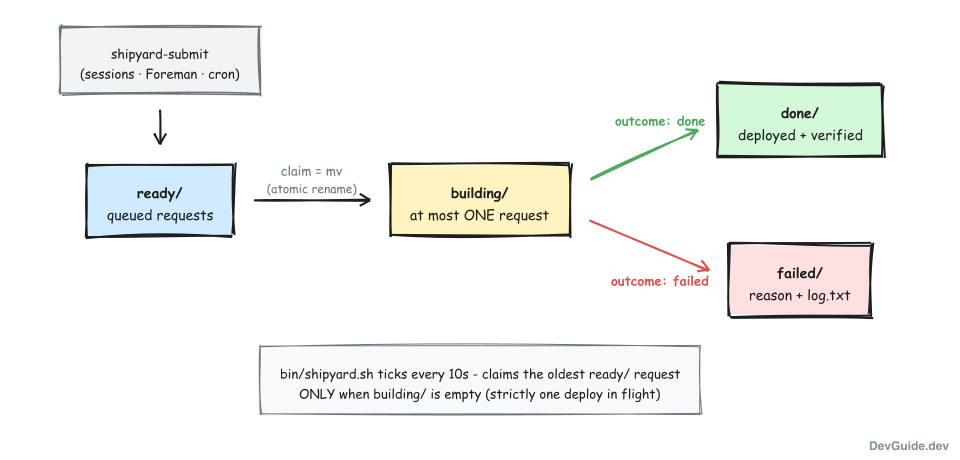
The supervisor (bin/shipyard.sh, started with make shipyard-up) ticks every 10 seconds and enforces one rule above all others: if building/ is non-empty, do nothing. Only when the previous deploy has fully finished does it claim the oldest request in ready/ and hand it to the executor. Strictly one deploy in flight, across every project and every submitter. The serialization is not an implementation detail - it is the feature.
The branch model: wt/<slug>, main, and ship
This is the heart of the system. Every repo ends up with three kinds of branches, each with one job:
| Branch | Job |
|---|---|
wt/<slug> | Work branches. One per task, living in a sibling worktree ~/wk/wt-<project>-<slug> |
main/master | The integration branch. Docs and tests land here directly; deploys land here only after they are verified |
ship | The deploy candidate, and after a verified deploy, the pointer to exactly what is live in production |
Day-to-day work never happens on main. Each task (mine or an agent’s) gets its own wt/<slug> branch in its own worktree, so parallel sessions cannot step on each other’s working tree. That part existed before Shipyard. What Shipyard adds is what happens between “my branch is ready” and “prod runs it”:
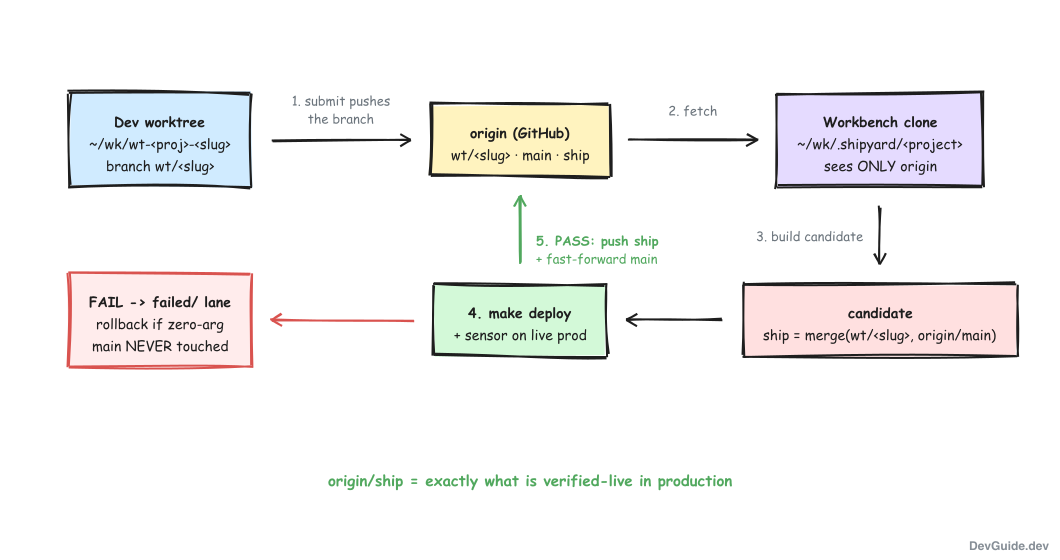
When you submit, shipyard-submit first pushes your branch to origin. This is non-negotiable: every byte that might reach production must be origin-recoverable before it is even queued. Then the executor takes over, and it does not work in your repo at all. It works in a separate, persistent clone at ~/wk/.shipyard/<project> - the workbench.
The workbench clone is the structural trick I like most. Because it is an ordinary clone that only talks to origin, it physically cannot see anything you did not push. There is no way to accidentally deploy a local-only commit, because the deployer has no path to your local state. And if your dev repo is ever wedged mid-rebase with conflict markers everywhere, the deployer does not care - it never reads your tree.
Inside the workbench, for every request, the executor builds the candidate:
ship := merge(your pushed commit, origin/main)Concretely: reset the ship branch to the tip of origin/main, then merge the submitted SHA into it. This guarantees the candidate contains everything already integrated plus your change. If the merge conflicts, the request fails right there with reason merge_conflict, nothing is deployed, and the fix is yours: rebase your branch onto origin/main and resubmit.
Then comes the part that inverts the classic flow. The executor deploys the candidate and runs the module’s verification sensor before anything touches main:
- PASS: push
shipto origin (soorigin/shipnow records exactly what is verified-live in prod), then push the same tree tomain. The merge to main happens after prod says yes. - FAIL: run the module’s zero-argument rollback recipe if it has one; either way the request goes to
failed/.mainis untouched. A failed candidate never lands on the default branch.
That ordering quietly answers the 2am question too. “What is running in prod right now?” is no longer a memory exercise or a dig through deploy logs. It is a git ref:
git fetch origin ship && git log origin/ship -1How a deploy actually runs
Here is one request, end to end. From inside the project checkout (worktree or main tree):
~/wk/mytodos/bin/shipyard-submit --project casestatusdotin --module app --waitSubmit does four things before queueing anything: resolves your current branch to an exact commit SHA, checks the module exists in the repo’s recipe file, pushes the branch to origin, and warns loudly if the supervisor’s heartbeat is stale (a queued request in a stopped factory should never be a silent surprise). Then it allocates the next request id and drops request.json into ready/:
shipyard-submit: queued 0042-casestatusdotin-app  (casestatusdotin/app @ 92be971... from branch wt/fix-hc-parser)
  watch: make -C ~/wk/mytodos shipyard-status   ·   board: http://localhost:7777/ship/0042-casestatusdotin-app
On its next tick the supervisor claims the request (the mv into building/) and runs the executor, which works through a fixed sequence. Each step can fail the request with a specific reason, and every step’s output is appended to the request’s log.txt:
- Workbench prep. Clone
~/wk/.shipyard/<project>if this is the project’s first request (nothing to provision by hand). Then scrub it back to fresh-checkout equivalence: abort any stale merge,git clean -ffdx, fetch. - Candidate build.
git checkout -B ship origin/main, then merge the submitted SHA. Conflict =merge_conflict, stop, nothing deployed. - Dependency bootstrap.
make worktree-initif the repo defines it, otherwise a sensible fallback (go mod download,npm install, or a Python venv). - Pre-flight assertion. The deploy-freshness gate runs against the workbench as a belt-and-suspenders check. By construction it should always pass; if it does not, that is a bug worth stopping for.
- Deploy.
cdinto the module’s directory and run itsmakedeploy target. Secrets are sourced inside this step’s subshell only - the supervisor process never holds them. - Sensor. Run the module’s verification target against live prod (or, if the module defines no sensor, treat the deploy’s own exit code as the verdict).
- Record. On PASS, push
ship(with--force-with-lease) and push the verified tree tomain. On FAIL, roll back if a zero-arg rollback exists, alert via Telegram, route tofailed/.
The final state is written to outcome.json, which is what --wait prints and what the dashboard reads:
{
  "status": "done",
  "reason": "deployed",
  "summary": "deployed casestatusdotin/app + merged to main",
  "project": "casestatusdotin",
  "module": "app",
  "ref_sha": "92be9716...",
  "deployed_sha": "92be9716..."
}
Two corners of step 7 deserve a closer look, because they encode the system’s values.
The push race. Suppose that while your deploy was running, someone landed a docs commit on main. The executor’s push to main is rejected as non-fast-forward. It will not force-push, and it will not roll back a deploy that prod has already verified. Instead it checks what the new commits touch. If they are outside the module’s build inputs (docs, tests), it merges them in and retries, up to three times. If they touch build inputs - meaning main now describes a different build than the one verified - it stops, reports diverged, and leaves the situation for a human: prod is live and verified, main is briefly behind, and a person fast-forwards after a look. A verified deploy outranks branch tidiness, always.
Crash recovery. The executor maintains a small sentinel file (.shipping.json: pid, deadline, and whether the deploy phase already ran). If the executor process dies, the supervisor’s reconcile loop notices. Death before the deploy step is harmless: exec_crashed, safe to resubmit. Death after the deploy step is the scary one: prod state is unknown, so the request is marked prod_degraded and a Telegram alert fires that no kill-switch can silence.
Installing it on a new Mac
The whole system is two repos and three command-line tools. My sequence on a fresh machine:
- Restore dotfiles.
~/wk/dotfilescarries~/.claude/scripts/(the deploy-gate hook scripts) and the Claude Code settings that wire the PreToolUse hook. Running itsrestore.shputs those in place. - Clone the task hub.
git clone <mytodos-repo> ~/wk/mytodos. The lane directories ship as committed.gitkeeps; the per-request directories are gitignored runtime state, so the queue arrives empty and ready. - Prerequisites.
git,jq, andmake. Everything is plain bash, compatible with the ancient bash 3.2 that macOS ships - no Homebrew bash required. - Secrets (optional).
~/.secretsprovides the Telegram bot token for failure alerts. Without it, everything still works; you just lose the pings. - Onboard each repo you want deploying through the queue (next section).
- Start it.
make -C ~/wk/mytodos shipyard-upin a terminal tab you can see. There is deliberately no launchd service and no enable flag: running means on, not running means off, and a submit into a stopped Shipyard queues the request and tells you loudly how to start the supervisor.
The workbench clones under ~/wk/.shipyard/ create themselves on each project’s first request, so there is genuinely nothing else to provision.
The 30-second health check, any time, is:
make -C ~/wk/mytodos shipyard-status=== Shipyard (deploy queue) ===
lanes: ready 0 · building 0 · done 7 · failed 1
heartbeat: alive (4s ago, state=running-idle, pid=83214)
newest done: 0007-devguidedev-site (deployed_sha 3f1c9a2...)
newest failed: 0004-casestatusdotin-cadence (sensor_fail_no_rollback)Onboarding a repo: .foreman-ship.json
A repo joins the system by committing one file at its root: .foreman-ship.json, a map of deployable modules to their make recipes. Here is the real one from my largest project (a monorepo with three deployables):
{
  "modules": {
    "app": {
      "dir": "app",
      "deploy": "deploy",
      "sensor": "",
      "rollback": "rollback-auto",
      "embed_inputs": [],
      "high_risk_globs": []
    },
    "crawler": {
      "dir": "crawler",
      "deploy": "deploy",
      "sensor": "",
      "rollback": "",
      "embed_inputs": [],
      "high_risk_globs": []
    },
    "cadence": {
      "dir": "cadence",
      "deploy": "deploy",
      "sensor": "deploy-sensor",
      "rollback": "",
      "embed_inputs": [],
      "high_risk_globs": []
    }
  }
}| Field | Meaning |
|---|---|
dir | Directory (relative to repo root) where the make targets live |
deploy | The zero-argument deploy target |
sensor | Post-deploy verification target. Empty string = the deploy’s own exit code is the verdict |
rollback | Zero-argument rollback target. Empty = no auto-rollback; a failure routes to failed/ plus a Telegram ping |
embed_inputs | Extra paths that count as build inputs for the push-race check |
high_risk_globs | Paths whose changes force a human review before any automated deploy |
Note the constraint hiding in there: rollback recipes must take zero arguments. If rolling back needs a human to pick a version, it is not a rollback the machine can run at 3am, so the module declares none and failures wait for a person. Honest beats optimistic.
Onboarding has one more effect, and it is my favorite quality-of-life detail. A Claude Code PreToolUse hook watches every shell command, and once a repo has a .foreman-ship.json, any direct make deploy in that repo is blocked and redirected:
deploy-gate: BLOCKED - this repo is Shipyard-onboarded; direct 'make deploy' is redirected.
  submit via: shipyard-submit --project <proj> --module <mod>   (add --wait to block on the outcome)
  escape:     ALLOW_DIRECT_DEPLOY=1 make ...  - falls through to the freshness gate, NOT a free pass
Muscle memory and agent habits both type make deploy for years after you change the rules. The hook means nobody has to remember the new flow - the old flow physically stops working and tells you the new one. The ALLOW_DIRECT_DEPLOY=1 escape exists for emergencies, and even it still has to pass the freshness gate.
A sample lifecycle: one task, stash to shipped
To see where the queue fits, here is the full journey of one real task in my system. Some cast members, briefly: mytodos is my cross-session task stash (one markdown file per project), a Traveler is the small JSON record that tracks each task’s lifecycle stage, and Foreman is the build factory that turns approved plans into implemented code using its own serialized worker.
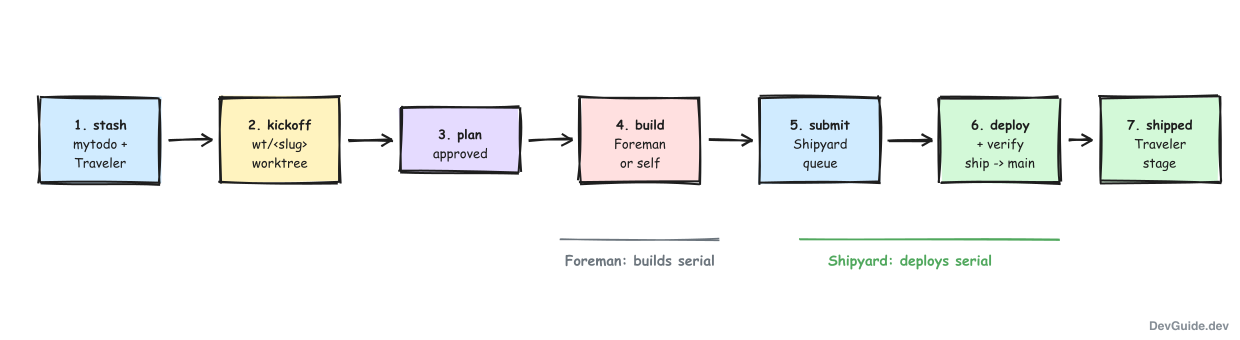
- Stash. An idea lands in
~/wk/mytodos/tasks/<project>.mdwith full cold-start context. A Traveler is minted; the task now has a number and a stage. - Kickoff.
make kickoffmaterializes the task’s identity: awt/<slug>branch in a sibling worktree~/wk/wt-<project>-<slug>, plus a manifest tying branch, worktree, and plan directory together. A planning session opens there. - Plan. The session researches and writes a plan; I approve it. The Traveler advances to
planned. - Build. Either the same session implements it, or
make foreman-addqueues it for Foreman, whose worker reuses the same worktree, implements, tests, and runs conformance checks. Foreman’s single worker keeps builds serial. - Submit. The terminal act of any deploying task:
shipyard-submit --project P --module M --waitfrom the worktree. The branch is pushed; the request queues; the Shipyard keeps deploys serial - across every submitter, human or machine. - Deploy + verify. The executor builds
ship = merge(branch, origin/main), deploys, runs the sensor, pushesshipand fast-forwardsmain. - Shipped. The outcome lands in
done/, the Traveler advances toshipped, the worktree is cleaned up, and the dashboard’s shipped lane shows the card.
Two queues, two domains: Foreman serializes builds so implementations do not trample each other’s worktrees; Shipyard serializes deploys so production only ever changes one verified step at a time. They coexist by owning entirely separate locks, heartbeats, and lanes.
All the commands
The daily set:
| Command | What it does |
|---|---|
make -C ~/wk/mytodos shipyard-up | Run the supervisor in a visible terminal. Ctrl-C stops it; stopped = off |
make -C ~/wk/mytodos shipyard-status | Lane counts, heartbeat verdict, in-flight request, newest done/failed |
~/wk/mytodos/bin/shipyard-submit | Queue a deploy (run from inside the project checkout) |
ALLOW_DIRECT_DEPLOY=1 make deploy | Emergency escape past the redirect; still pays the freshness gate |
shipyard-submit flags:
| Flag | Meaning |
|---|---|
--project P | Project name (= directory name under ~/wk) |
--module M | Module key from the repo’s .foreman-ship.json |
--ref BRANCH | Local branch to deploy. Default: the current branch. Tags and raw SHAs are refused (v1 contract) |
--wait | Block until the outcome; print outcome.json on stdout; exit 0 only on done |
--timeout MIN | With --wait, give up waiting after MIN minutes (default 30; the request itself stays queued) |
--traveler N | Optional provenance: link the request to a task card on the dashboard |
--item ID | Optional provenance: link to a Foreman item |
Tuning knobs, all environment variables with sane defaults: SHIPYARD_TICK (supervisor tick, 10s), SHIPYARD_DEADLINE_MIN (crash-recovery deadline, 90 min), SHIPYARD_STALE (heartbeat staleness threshold, 35s).
And the failure reasons you will actually meet in failed/, with what to do about each:
| Reason | What happened | What you do |
|---|---|---|
merge_conflict | Your branch conflicts with origin/main | Rebase onto origin/main, resubmit. Nothing deployed |
fetch_failed | Origin unreachable; no fresh candidate base | Fix connectivity, resubmit. Nothing deployed |
ref_unreachable | The SHA never made it to origin | Push the branch, resubmit |
gate_preflight | The should-be-impossible freshness check failed | Investigate before anything else |
sensor_fail | Deploy or sensor failed; zero-arg rollback ran and succeeded | Read log.txt, fix, resubmit. main untouched |
sensor_fail_no_rollback | Deploy or sensor failed; module has no auto-rollback | Check prod state by hand. main untouched |
prod_degraded | Deploy failed AND rollback failed | Emergency. Telegram already fired; manual recovery now |
diverged | Prod verified-live, but main moved on a build input mid-deploy | Human fast-forwards main. NO rollback |
exec_crashed | Executor died before deploying | Safe to resubmit |
shipyard_deadline | No outcome within the deadline; executor dead | Read log.txt, then resubmit |
When this doesn’t fit
Shipyard is built for one very specific shape of shop, and I want to be honest about the edges:
It is not CI/CD. Everything runs on my Mac. There is no remote runner, no artifact store, no environment promotion. If you have a team, you want the hosted version of these ideas (a merge queue plus deployment pipelines), not a bash supervisor in a terminal tab.
One berth means waiting. Strict serialization across all projects is the point, but it has a cost: a slow deploy delays every queued request behind it, even for unrelated projects. At my volume (a handful of deploys a day) this costs minutes and buys certainty. At 50 deploys a day it would need per-project berths.
v1 deploys local branches only. No tags, no arbitrary SHAs, no deploy-from-remote-only refs. That constraint is what makes “submit pushes your branch” a complete origin-recoverability story, but it would chafe in a release-tag workflow.
Filesystem state requires filesystem discipline. Lanes-as-directories and mv-as-lock are wonderfully debuggable (you can ls the entire system state), but they assume one machine and one filesystem. This design does not survive NFS or two hosts.
It leans on existing discipline. Every project already had a make deploy, most had sensors and zero-arg rollbacks, and all work already happened in per-task worktrees. Shipyard composes those pieces; it does not replace them. Without that floor, build the floor first.
Conclusion
The two-session story from the top has a different ending now. Session A submits; its request deploys, verifies, and fast-forwards main. Session B submits two minutes later; its candidate is built as merge(B's branch, origin/main) - which now contains A’s fix - and deploys on top of it. Order restored, nothing lost, and neither session had to know the other existed.
That is the whole trick: deploys stopped being commands and became transactions. Queued, serialized, verified before they are recorded, and recorded somewhere a tired human can query:
git log origin/ship -1And in the spirit of eating one’s own cooking: this blog onboarded to the queue in the same commit that added this post, and the deploy that published what you are reading was a devguidedev-site request in this very Shipyard. It rode the ready/ lane, merged through the workbench, passed the gate, and fast-forwarded master - while I watched it on the board like any other ship coming in.