Building Bulletproof Deployments: The knowngoodstate Pattern
A battle-tested deployment pattern that ensures every deploy can be safely rolled back, with pre-linked database backups and verified health checks.

I’ve seen deployments go wrong. Migrations that fail halfway, leaving the database in an inconsistent state. Code rollbacks that don’t account for schema changes. Teams scrambling to figure out what was even running before the deploy started.
So when I started my latest project, I built the deployment system first - before writing application code. This post documents the pattern I use: a simple, battle-tested approach that ensures every deployment can be safely rolled back.
The Four Ways Deployments Fail
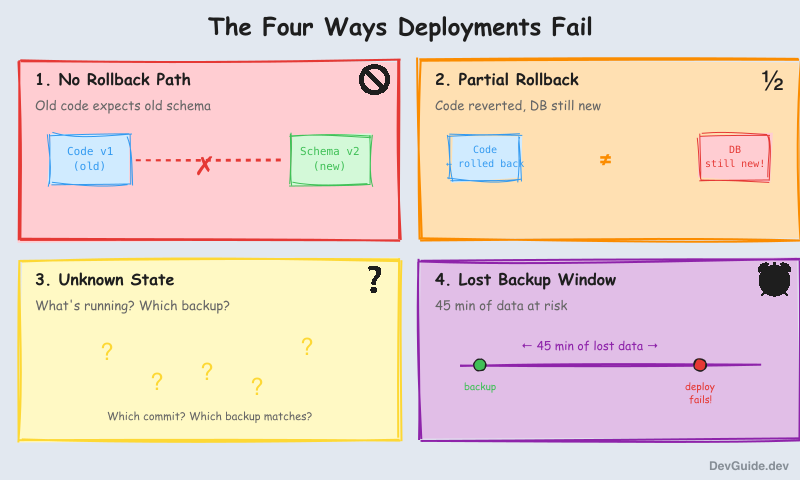
Traditional deployment approaches break in predictable ways:
-
No rollback path: “Just redeploy the old version” doesn’t work when database migrations have run. The old code expects the old schema.
-
Partial rollbacks: You revert the code, but the database is still in its new state. Now you have a mismatch.
-
Unknown state: A deploy fails. What’s actually running? What was deployed when? What backup corresponds to which code version?
-
Lost backup window: You have hourly backups, but the deploy happened 45 minutes after the last one. Rolling back means losing 45 minutes of user data - plus whatever happened during the failed deploy.
This pattern solves all four.
The Core Insight: knowngoodstate
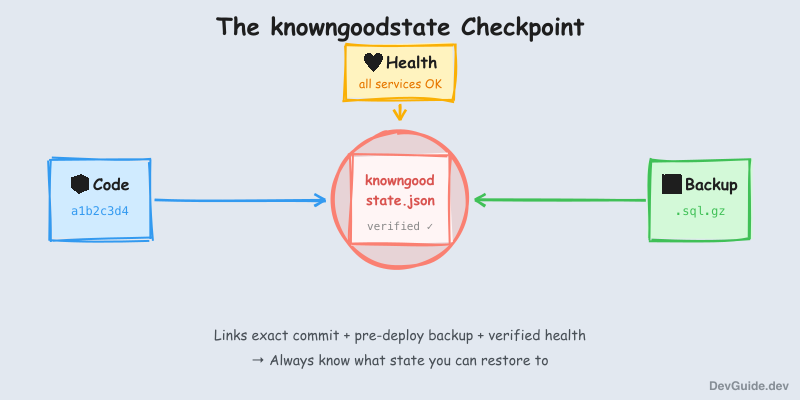
The key insight is simple: every successful deployment should create a verified checkpoint that links code, database backup, and health status together.
I call this checkpoint knowngoodstate. After every successful deployment, the system creates a file like this:
{
  "state_id": "2025-12-05-a1b2c3d4",
  "environment": "staging",
  "created_at": "2025-12-05T13:01:47Z",
  "commit": {
    "sha": "a1b2c3d4e5f6...",
    "short": "a1b2c3d4",
    "message": "feat: add user preferences"
  },
  "backup": {
    "path": "gs://myproject-backups/pre-deploy/2025-12-05-a1b2c3d4.sql.gz",
    "verified": true,
    "taken_at": "2025-12-05T13:01:47Z"
  },
  "services": {
    "api": { "healthy": true },
    "web": { "healthy": true }
  },
  "verification": {
    "health_checks_passed": true,
    "timestamp": "2025-12-05T13:01:47Z"
  }
}
This isn’t just metadata. It’s a verified receipt that guarantees:
- This exact commit was deployed
- A backup was taken before any changes (named after the commit for correlation)
- All services passed health checks after deployment
- You can restore to this exact state at any time
The critical detail: the backup is taken BEFORE deployment, but named after the TARGET commit. This means you can always restore to the state that existed right before any given deployment.
The Deployment Flow
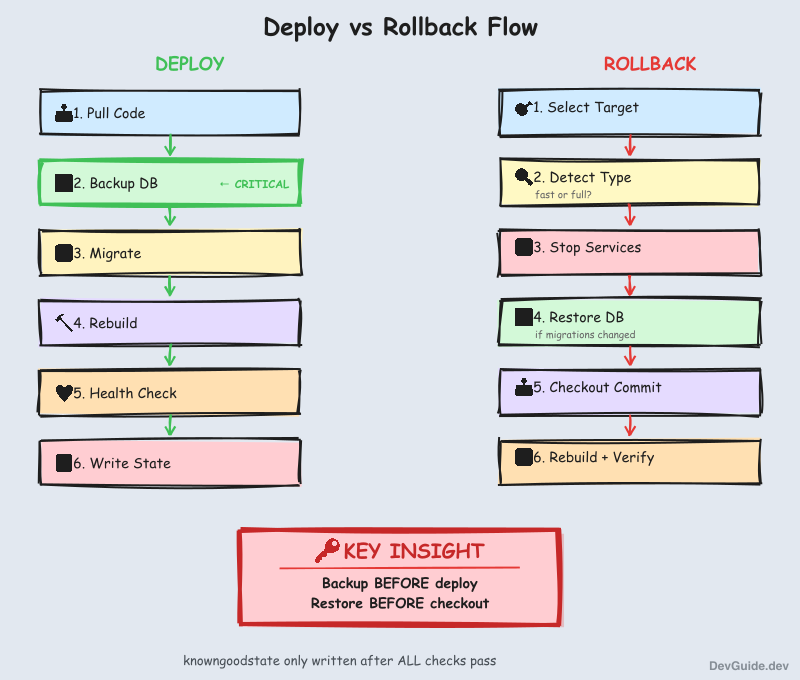
Every deployment follows this sequence:
┌─────────────────────────────────────────────────────────────┐
│                        DEPLOY                                │
├─────────────────────────────────────────────────────────────┤
│                                                              │
│  1. PRE-FLIGHT CHECKS                                        │
│     └─ Disk space, clean git state                           │
│                                                              │
│  2. PULL CODE                                                │
│     └─ git pull (now we know the target commit)              │
│                                                              │
│  3. BACKUP DATABASE ← Critical step                          │
│     └─ pg_dump → gzip → upload to cloud storage              │
│     └─ Named: {date}-{commit}.sql.gz                         │
│     └─ ABORT if backup fails                                 │
│                                                              │
│  4. RUN MIGRATIONS                                           │
│     └─ On failure: AUTO-RESTORE backup, abort                │
│                                                              │
│  5. REBUILD & RESTART SERVICES                               │
│     └─ docker compose up -d --build                          │
│                                                              │
│  6. HEALTH CHECK ALL SERVICES                                │
│     └─ curl /health for each                                 │
│                                                              │
│  7. WRITE KNOWNGOODSTATE                                     │
│     └─ Only if ALL health checks pass                        │
│                                                              │
└─────────────────────────────────────────────────────────────┘
The key rules:
- No backup = no deploy. If the backup fails, we abort. Deploying without a rollback path is not allowed.
- Migration failure triggers auto-restore. The backup we just took gets restored immediately.
- knowngoodstate only written after verification. It’s a receipt for success, not an optimistic marker.
Smart Rollback Detection
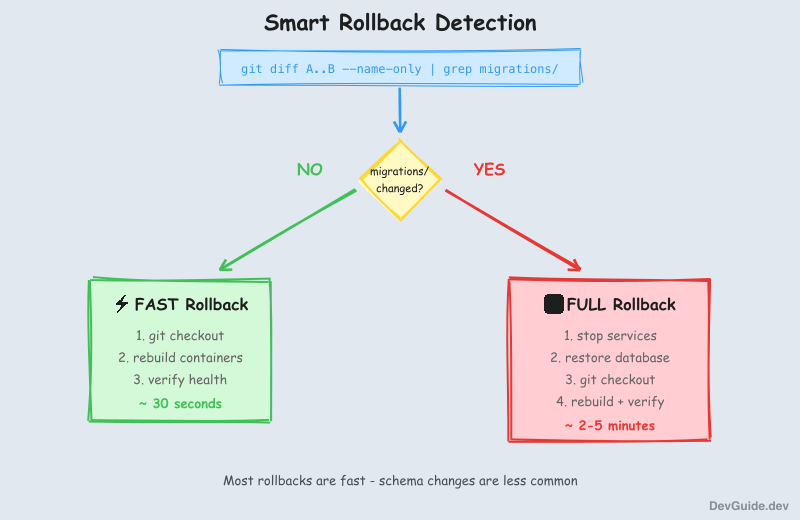
Not all rollbacks need database restoration. If you’re rolling back from commit B to commit A, the system checks:
git diff A..B --name-only | grep 'migrations/'- No migration changes? → Fast rollback: just
git checkout+ rebuild containers - Migration changes? → Full rollback: restore database backup +
git checkout+ rebuild
This makes rollbacks much faster when you’re just reverting a bug fix that didn’t touch the schema.
The Rollback Flow
┌─────────────────────────────────────────────────────────────┐
│                       ROLLBACK                               │
├─────────────────────────────────────────────────────────────┤
│                                                              │
│  1. SELECT TARGET                                            │
│     └─ Show deployment history, user picks commit            │
│                                                              │
│  2. DETECT ROLLBACK TYPE                                     │
│     └─ Check if migrations changed → full or fast?           │
│                                                              │
│  3. STOP SERVICES                                            │
│     └─ docker compose down                                   │
│                                                              │
│  4. RESTORE DATABASE (full rollback only)                    │
│     └─ Download backup from cloud storage                    │
│     └─ DROP + CREATE + pg_restore                            │
│                                                              │
│  5. CHECKOUT TARGET COMMIT                                   │
│     └─ git checkout {sha}                                    │
│                                                              │
│  6. REBUILD & RESTART                                        │
│     └─ docker compose up -d --build                          │
│                                                              │
│  7. HEALTH CHECK + UPDATE KNOWNGOODSTATE                     │
│                                                              │
└─────────────────────────────────────────────────────────────┘
Important ordering: restore database BEFORE checkout. The restore tools exist in the current code; after checkout, they might be different.
Implementation Highlights
The pattern needs three scripts: lib.sh (shared functions), push.sh (deploy), and rollback.sh.
The Critical Functions
# Take pre-deploy backup - returns GCS path or empty string on failure
take_pre_deploy_backup() {
    local env="$1"
    local commit_sha="$2"
    local release_id="$(date -u +%Y-%m-%d)-${commit_sha}"

    if backup-db.sh --env="$env" --name="$release_id"; then
        echo "gs://myproject-backups-${env}/pre-deploy/${release_id}.sql.gz"
    else
        echo ""  # Signals failure to caller
    fi
}

# Check if migrations changed between two commits
migrations_changed() {
    local from_sha="$1"
    local to_sha="$2"

    local changed=$(git diff "$from_sha".."$to_sha" --name-only | grep -c 'migrations/' || true)
    [ "$changed" -gt 0 ]
}
The Deploy Pattern
# Step 1: Backup BEFORE any changes
BACKUP_PATH=$(take_pre_deploy_backup "$ENV" "$COMMIT_SHA")
if [ -z "$BACKUP_PATH" ]; then
    echo "ERROR: Backup failed - aborting deployment"
    exit 1
fi

# Step 2: Run migrations with auto-restore on failure
if ! docker exec api alembic upgrade head; then
    echo "Migration failed - restoring backup..."
    restore-db.sh --env="$ENV" --backup="$BACKUP_PATH" --force
    exit 1
fi

# Step 3: Only write knowngoodstate after ALL checks pass
if [ -z "$HEALTH_FAILED" ]; then
    write_knowngoodstate "$ENV" "$COMMIT_SHA" "$BACKUP_PATH"
fi
The Rollback Pattern
# Stop services BEFORE checkout (avoid running mismatched code/schema)
for svc in api web worker; do
    (cd "$svc" && docker compose down) || true
done

# Restore database BEFORE checkout (restore tools are in current code)
if [ "$NEEDS_DB_RESTORE" = true ]; then
    restore-db.sh --env="$ENV" --file="$BACKUP_PATH" --force
fi

# Now safe to checkout
git checkout "$TARGET_COMMIT"

# Rebuild with old code
for svc in api web worker; do
    (cd "$svc" && docker compose up -d --build)
done
File Structure
project/
├── deploy/
│   ├── knowngoodstate.staging.json     # Current verified state
│   ├── knowngoodstate.production.json
│   └── history/
│       └── {env}/knowngood/            # Historical states
├── scripts/
│   ├── deployment/
│   │   ├── lib.sh       # Shared functions
│   │   ├── push.sh      # Deploy script
│   │   └── rollback.sh  # Rollback script
│   └── backup/
│       ├── backup-db.sh
│       └── restore-db.sh
└── .env.{env}.age       # Encrypted secrets
Optional: A Simple UI
I built a small web dashboard (the “Toolbox”) that:
- Shows deployment history with commit messages
- Displays the current knowngoodstate for each environment
- Provides one-click rollback buttons
- Streams rollback progress in real-time via WebSocket
The key insight for the UI: always fetch the current state from the VM, not from local files. After a rollback triggered from the UI, only the VM’s knowngoodstate is updated. Local copies may be stale.
// Fetch from the actual running environment, not local files
const currentRelease = await fetch(
  'https://staging-toolbox.example.com/api/current-release'
);
Lessons Learned
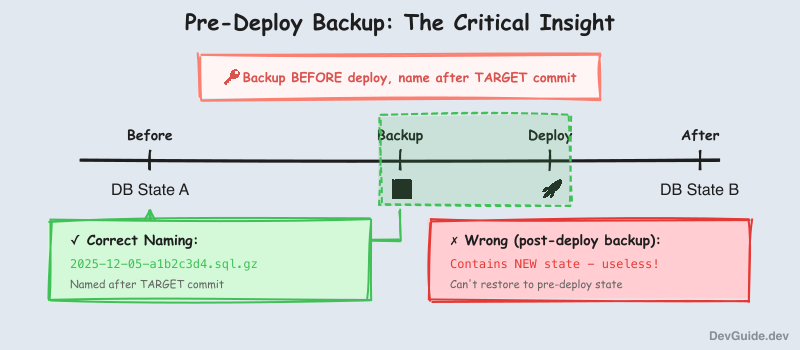
1. Pre-deploy backups, not post-deploy. It took me a while to realize this. A backup taken after deployment is useless for rollback - it contains the new state. You need the backup taken before the deploy, linked to the commit you’re deploying.
2. Name backups after the target commit.
2025-12-05-a1b2c3d4.sql.gz is much more useful than 2025-12-05-130147.sql.gz. When you’re looking at a list of backups at 3am, you want to immediately know which code version each one corresponds to.
3. The VM is the source of truth. I initially had the local machine track what was deployed. This breaks as soon as someone triggers a rollback from the server, or deploys from a different machine. The running system should always know its own state.
4. Ordering matters in rollback. Stop services → restore database → checkout code → rebuild. Getting this wrong means briefly running old code against new schema, or vice versa.
5. Migration detection saves time. Most rollbacks are for bugs that don’t involve schema changes. Detecting this and skipping the database restore makes rollbacks much faster (seconds vs minutes).
6. Fail early, fail loudly. If the backup fails, abort immediately. If health checks fail, don’t write knowngoodstate. The system should never claim success unless everything actually succeeded.
When This Is Overkill
This pattern is designed for:
- Single-VM deployments (or simple multi-VM setups)
- Services with a PostgreSQL database
- Teams that deploy frequently and need confidence
It’s probably overkill if:
- You’re using a PaaS with built-in rollback (Heroku, Railway)
- You have no database or only use managed services with their own backup
- You deploy once a month and can afford manual recovery
Conclusion
The core ideas are simple:
- Every deploy creates a checkpoint that links code, backup, and health status
- Backups are taken BEFORE deployment, named after the target commit
- knowngoodstate is only written after verification - it’s a receipt, not a wish
- Smart rollback detection distinguishes fast (code-only) from full (code + database)
- The running system is the source of truth for its own state
I’ve been using this pattern for months now. Deployments feel safe. When something goes wrong, I know exactly what state I can restore to, and the restore takes minutes, not hours.
The full implementation scripts are available in the appendix below.
Appendix: Full Implementation
For reference and knowledge preservation, here are the complete scripts.
scripts/deployment/lib.sh
#!/bin/bash
# Shared functions for deployment tracking

set -euo pipefail

DEPLOYMENT_DIR="${DEPLOYMENT_DIR:-/opt/myproject/deployments}"
HISTORY_FILE="${DEPLOYMENT_DIR}/history.json"
MAX_HISTORY=20

ensure_deployment_dir() {
    mkdir -p "$DEPLOYMENT_DIR"
    if [ ! -f "$HISTORY_FILE" ]; then
        echo '{"deployments":[]}' > "$HISTORY_FILE"
    fi
}

add_deployment() {
    local env="$1"
    local commit_sha="$2"
    local commit_message="$3"
    local status="$4"
    local db_backup_path="${5:-}"
    local timestamp=$(date -Iseconds)
    local id="deploy_$(date +%Y%m%d_%H%M%S)"

    ensure_deployment_dir

    local entry=$(cat <<EOF
{
    "id": "$id",
    "commit_sha": "$commit_sha",
    "commit_message": "$commit_message",
    "environment": "$env",
    "timestamp": "$timestamp",
    "status": "$status",
    "db_backup_path": "$db_backup_path"
}
EOF
)

    local tmp_file=$(mktemp)
    jq --argjson entry "$entry" --argjson max "$MAX_HISTORY" \
        '.deployments = ([$entry] + .deployments) | .deployments = .deployments[:$max]' \
        "$HISTORY_FILE" > "$tmp_file" && mv "$tmp_file" "$HISTORY_FILE"

    echo "$id"
}

update_deployment_status() {
    local id="$1"
    local status="$2"
    local error="${3:-}"
    local completed_at=$(date -Iseconds)

    local tmp_file=$(mktemp)
    jq --arg id "$id" --arg status "$status" --arg error "$error" --arg completed "$completed_at" \
        '(.deployments[] | select(.id == $id)) |= . + {status: $status, error: $error, completed_at: $completed}' \
        "$HISTORY_FILE" > "$tmp_file" && mv "$tmp_file" "$HISTORY_FILE"
}

get_history() {
    local env="$1"
    local limit="${2:-20}"

    ensure_deployment_dir

    jq --arg env "$env" --argjson limit "$limit" \
        '[.deployments[] | select(.environment == $env)][:$limit]' \
        "$HISTORY_FILE"
}

migrations_changed() {
    local from_sha="$1"
    local to_sha="$2"

    local changed=$(git diff "$from_sha".."$to_sha" --name-only | grep -c 'migrations/' || true)
    [ "$changed" -gt 0 ]
}

take_pre_deploy_backup() {
    local env="$1"
    local commit_sha="$2"
    local release_id="$(date -u +%Y-%m-%d)-${commit_sha}"

    echo "Taking pre-deploy backup for release: $release_id" >&2

    if "$SCRIPT_DIR/../backup/backup-db.sh" --env="$env" --name="$release_id" >&2; then
        local bucket="myproject-backups-${env}"
        echo "gs://${bucket}/pre-deploy/${release_id}.sql.gz"
    else
        echo ""
    fi
}

backup_exists() {
    local gcs_path="$1"
    gsutil -q stat "$gcs_path" 2>/dev/null
}

check_disk_space() {
    local required_gb="$1"
    local operation="${2:-operation}"

    local available_kb=$(df / | awk 'NR==2 {print $4}')
    local available_gb=$((available_kb / 1024 / 1024))

    if [ "$available_gb" -lt "$required_gb" ]; then
        echo "ERROR: Insufficient disk space for $operation"
        echo "  Required: ${required_gb}GB, Available: ${available_gb}GB"
        return 1
    fi

    echo "Disk space OK: ${available_gb}GB available"
    return 0
}
scripts/deployment/push.sh
#!/bin/bash
set -euo pipefail

SCRIPT_DIR="$(cd "$(dirname "${BASH_SOURCE[0]}")" && pwd)"
source "$SCRIPT_DIR/lib.sh"

ENV=""
while [[ $# -gt 0 ]]; do
    case $1 in
        --env=*) ENV="${1#*=}"; shift ;;
        *) echo "Usage: $0 --env=<staging|production>"; exit 1 ;;
    esac
done

[ -z "$ENV" ] && { echo "ERROR: --env required"; exit 1; }

cd /opt/myproject/services/myproject

# Pre-flight checks
check_disk_space 5 "deployment" || exit 1

if [[ -n $(git status --porcelain) ]]; then
    echo "ERROR: Uncommitted changes on VM"
    exit 1
fi

# Pull and get commit info
git pull
COMMIT_SHA=$(git rev-parse --short HEAD)
COMMIT_MSG=$(git log -1 --pretty=format:'%s' | head -c 100)

echo "=== Deploying $COMMIT_SHA to $ENV ==="

# Record as pending
DEPLOY_ID=$(add_deployment "$ENV" "$COMMIT_SHA" "$COMMIT_MSG" "pending" "")

# CRITICAL: Backup before any changes
BACKUP_PATH=$(take_pre_deploy_backup "$ENV" "$COMMIT_SHA")
if [ -z "$BACKUP_PATH" ]; then
    update_deployment_status "$DEPLOY_ID" "failed" "backup failed"
    echo "ERROR: Backup failed - aborting"
    exit 1
fi

# Load environment
./scripts/load-env.sh "$ENV"

# Rebuild services
for svc in api web worker; do
    if ! (cd "$svc" && docker compose --env-file ../.env up -d --build); then
        update_deployment_status "$DEPLOY_ID" "failed" "rebuild $svc failed"
        exit 1
    fi
done

# Run migrations with auto-restore on failure
if ! docker exec myproject-api alembic upgrade head; then
    echo "Migration failed - restoring backup..."
    "$SCRIPT_DIR/../backup/restore-db.sh" --env="$ENV" --file="$BACKUP_PATH" --force
    update_deployment_status "$DEPLOY_ID" "failed" "migration failed"
    exit 1
fi

# Health checks
sleep 10
HEALTH_FAILED=""
for url in "http://localhost:3000/health" "http://localhost:8080/health"; do
    curl -sf "$url" > /dev/null 2>&1 || HEALTH_FAILED="yes"
done

if [ -n "$HEALTH_FAILED" ]; then
    update_deployment_status "$DEPLOY_ID" "failed" "health check failed"
    exit 1
fi

# Success - write knowngoodstate
TIMESTAMP=$(date -u +"%Y-%m-%dT%H:%M:%SZ")
STATE_ID="$(date -u +%Y-%m-%d)-$COMMIT_SHA"

cat > "deploy/knowngoodstate.$ENV.json" <<EOF
{
  "state_id": "$STATE_ID",
  "environment": "$ENV",
  "created_at": "$TIMESTAMP",
  "commit": {
    "sha": "$(git rev-parse HEAD)",
    "short": "$COMMIT_SHA",
    "message": "$COMMIT_MSG"
  },
  "backup": {
    "path": "$BACKUP_PATH",
    "verified": true,
    "taken_at": "$TIMESTAMP"
  },
  "verification": {
    "health_checks_passed": true,
    "timestamp": "$TIMESTAMP"
  }
}
EOF

mkdir -p "deploy/history/$ENV/knowngood"
cp "deploy/knowngoodstate.$ENV.json" "deploy/history/$ENV/knowngood/$STATE_ID.json"

update_deployment_status "$DEPLOY_ID" "success" ""
echo "=== Deployment successful: $COMMIT_SHA ==="
scripts/deployment/rollback.sh
#!/bin/bash
set -euo pipefail

SCRIPT_DIR="$(cd "$(dirname "${BASH_SOURCE[0]}")" && pwd)"
source "$SCRIPT_DIR/lib.sh"

ENV=""
TARGET_COMMIT=""
FORCE=false

while [[ $# -gt 0 ]]; do
    case $1 in
        --env=*) ENV="${1#*=}"; shift ;;
        --commit=*) TARGET_COMMIT="${1#*=}"; shift ;;
        --force) FORCE=true; shift ;;
        *) shift ;;
    esac
done

[ -z "$ENV" ] && { echo "ERROR: --env required"; exit 1; }

cd /opt/myproject/services/myproject
ensure_deployment_dir
check_disk_space 3 "rollback" || exit 1

CURRENT_SHA=$(git rev-parse --short HEAD)

# Interactive selection if no commit specified
if [ -z "$TARGET_COMMIT" ]; then
    echo "=== Deployment History for $ENV ==="
    HISTORY=$(get_history "$ENV" 10)
    echo "$HISTORY" | jq -r '.[] | "  \(.commit_sha)  \(.commit_message[:50])"'
    read -p "Enter commit SHA: " TARGET_COMMIT
fi

[ -z "$TARGET_COMMIT" ] && exit 1

# Get backup path from history
HISTORY=$(get_history "$ENV" 20)
BACKUP_PATH=$(echo "$HISTORY" | jq -r --arg sha "$TARGET_COMMIT" \
    '.[] | select(.commit_sha == $sha) | .db_backup_path // ""')

# Detect rollback type
NEEDS_DB_RESTORE=false
migrations_changed "$TARGET_COMMIT" "$CURRENT_SHA" && NEEDS_DB_RESTORE=true

echo "Rollback: $CURRENT_SHA → $TARGET_COMMIT"
echo "Type: $([ "$NEEDS_DB_RESTORE" = true ] && echo "FULL (with DB)" || echo "FAST (code only)")"

[ "$FORCE" != true ] && { read -p "Proceed? [y/N] " c; [ "$c" != "y" ] && exit 0; }

# Record rollback
ROLLBACK_ID=$(add_deployment "$ENV" "$TARGET_COMMIT" "ROLLBACK" "pending" "")

# Stop services FIRST
for svc in api web worker; do
    (cd "$svc" && docker compose down) || true
done

# Restore database BEFORE checkout
if [ "$NEEDS_DB_RESTORE" = true ] && [ -n "$BACKUP_PATH" ]; then
    "$SCRIPT_DIR/../backup/restore-db.sh" --env="$ENV" --file="$BACKUP_PATH" --force || {
        update_deployment_status "$ROLLBACK_ID" "failed" "db restore failed"
        exit 1
    }
fi

# Now checkout
git checkout "$TARGET_COMMIT"

# Rebuild
./scripts/load-env.sh "$ENV"
for svc in api web worker; do
    (cd "$svc" && docker compose --env-file ../.env up -d --build)
done

# Verify
sleep 10
HEALTH_FAILED=""
for url in "http://localhost:3000/health" "http://localhost:8080/health"; do
    curl -sf "$url" > /dev/null 2>&1 || HEALTH_FAILED="yes"
done

if [ -n "$HEALTH_FAILED" ]; then
    update_deployment_status "$ROLLBACK_ID" "failed" "health check failed"
    exit 1
fi

update_deployment_status "$ROLLBACK_ID" "success" ""
echo "=== Rollback successful: now at $TARGET_COMMIT ==="
scripts/backup/backup-db.sh
#!/bin/bash
set -euo pipefail

ENV=""
NAME=""

while [[ $# -gt 0 ]]; do
    case $1 in
        --env=*) ENV="${1#*=}"; shift ;;
        --name=*) NAME="${1#*=}"; shift ;;
        *) shift ;;
    esac
done

[ -z "$ENV" ] && { echo "ERROR: --env required"; exit 1; }
[ -z "$NAME" ] && NAME="manual-$(date +%Y%m%d-%H%M%S)"

BUCKET="myproject-backups-${ENV}"
BACKUP_FILE="/tmp/${NAME}.sql.gz"

echo "Creating backup: $NAME"
docker exec myproject-db pg_dump -U postgres myproject | gzip > "$BACKUP_FILE"

gsutil cp "$BACKUP_FILE" "gs://${BUCKET}/pre-deploy/${NAME}.sql.gz"
rm -f "$BACKUP_FILE"

echo "Backup complete: gs://${BUCKET}/pre-deploy/${NAME}.sql.gz"
scripts/backup/restore-db.sh
#!/bin/bash
set -euo pipefail

ENV=""
FILE=""
FORCE=false

while [[ $# -gt 0 ]]; do
    case $1 in
        --env=*) ENV="${1#*=}"; shift ;;
        --file=*) FILE="${1#*=}"; shift ;;
        --force) FORCE=true; shift ;;
        *) shift ;;
    esac
done

[ -z "$ENV" ] && { echo "ERROR: --env required"; exit 1; }
[ -z "$FILE" ] && { echo "ERROR: --file required"; exit 1; }

if [ "$FORCE" != true ]; then
    read -p "This will DROP the database. Continue? [y/N] " confirm
    [ "$confirm" != "y" ] && exit 0
fi

LOCAL_FILE="/tmp/restore-$(date +%s).sql.gz"

echo "Downloading backup..."
gsutil cp "$FILE" "$LOCAL_FILE"

echo "Restoring database..."
docker exec myproject-db psql -U postgres -c "DROP DATABASE IF EXISTS myproject;"
docker exec myproject-db psql -U postgres -c "CREATE DATABASE myproject;"
gunzip -c "$LOCAL_FILE" | docker exec -i myproject-db psql -U postgres myproject

rm -f "$LOCAL_FILE"
echo "Restore complete"
Makefile Targets
push-staging:
	ssh myproject-staging "cd /opt/myproject && scripts/deployment/push.sh --env=staging"

push-production:
	ssh myproject-production "cd /opt/myproject && scripts/deployment/push.sh --env=production"

rollback-staging:
	ssh -t myproject-staging "cd /opt/myproject && scripts/deployment/rollback.sh --env=staging"

rollback-production:
	ssh -t myproject-production "cd /opt/myproject && scripts/deployment/rollback.sh --env=production"